From Zendesk to Chatwoot ── How We Rebuilt Our CS Flow Around AI
Hello! I’m Francis, in charge of AIOps at AnotherBall, where I work on applying AI to internal operations. This post is about how we rebuilt our CS flow around AI — bringing first reply time from 1,186 minutes down to under a minute and ending up with more insight into our users than ever.
Moving to Chatwoot
We were originally using Zendesk for customer support. Users would submit a form from the “Contact Us” section in the app, and CS would handle it through Zendesk’s ticket interface. We wanted to use AI to improve CS efficiency, but the more we invested in AI-assisted responses, the more we ran up against the platform’s limitations. Zendesk’s architecture wasn’t really built for a high level of AI customization — customizing the response flow required paid add-ons and workarounds. We wanted granular control over tones, template usage, and escalation rules per inquiry category, but Zendesk made that difficult.
Chatwoot was able to give us this control — it let us plug our own automation layer into the workflow while providing fine control over the AI responses. We’re also keeping operating costs low with the hosted plan, and we have the option to move to the open-source/self-hosted edition if we ever need to. Having an open-source foundation also makes the platform’s features overall much more transparent and easy to troubleshoot.
The Problem: Chatwoot is Chat-First, We’re Form-First
Chatwoot is a chat-based CS tool, but when we were using Zendesk, we handled inquiries through forms. Most issues don’t require real-time support, and we actually want users to include as much detail as possible in their first message. Chat makes it too easy to fire off incomplete messages, leading to unnecessary back-and-forth, so we didn’t want to switch our inquiry flow to chat.
To respond to inquiries, we also needed information such as the user’s device model, OS version, and app version. Our existing form lets us pre-populate device information automatically when users submit from within the app, so they don’t have to type it themselves. Doing that reliably with a chat widget wasn’t straightforward, so I needed a way to keep the form-based intake while still converting each inquiry into a native Chatwoot conversation.
The Solution: Google Forms + Sheets + Apps Script
I went with a stack I could fully control:
- Google Forms — the user-facing inquiry form
- Google Spreadsheet — form responses land here automatically
- Google Apps Script — handles connection to Chatwoot and Slack
When a user submits the form, an Apps Script trigger formats the submission (including all the fields) and sends it as an email to our Google support inbox. Chatwoot is connected to that mailbox, so each email is automatically ingested as a new conversation with the full context preserved. Once the conversation exists, I use Chatwoot’s API to apply the inquiry-category label and set a few contact attributes.
I also have a script that functions as a webhook handler. Chatwoot fires a message_created event for every new message, which triggers the script to send the message to Slack: customer messages open a new thread, agent and AI replies post as threaded responses.
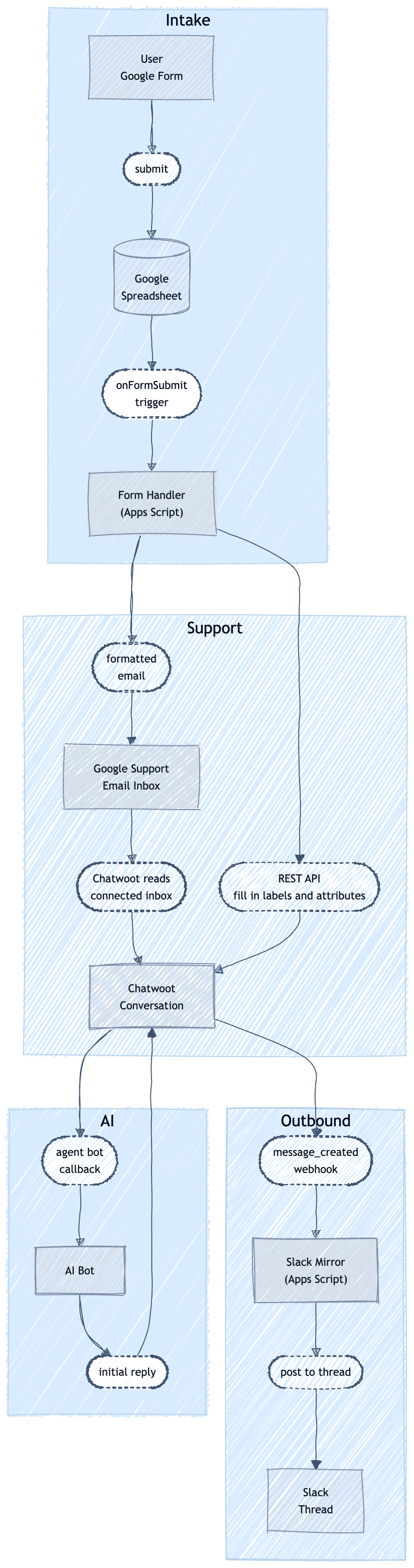
CS inquiry flow: Google Form → Chatwoot → Slack
Every inquiry lands in the Google Sheet, which is the most valuable part of the architecture. With all the raw data there, I built an automated weekly CS digest: every Friday, an LLM classifies the week’s inquiries (including feature requests), and a script then posts a bilingual JP/EN summary to Slack.
As a result, the team reacted quickly, and it’s sparked ideas beyond CS — applying a similar approach to our social media and getting a better sense of how users experience the app. This feels like the beginning of something bigger: not just responding to our community, but actually knowing them.
Prompt Engineering for Chatwoot
Here are a few prompt-engineering choices that made our AI replies more effective:
Explicit template structure. I include the exact headers, tone guidelines, and sign-off patterns our human agents use. The model follows them reliably when the structure is explicit.
1
2
3
4
5
6
Role: You write professional emails on behalf of [App] Support.
Use a greeting, structured paragraphs, and a courteous closing.
Insert TWO line breaks between paragraphs.
Greeting: Address the user by username (e.g. "user_12345").
If no identifier is available, use a neutral greeting.Inquiry type routing. Different inquiry types get different system prompts. We have the bot identify the inquiry type using the message content and select the appropriate prompt — no manual tagging required.
Escalation logic. The model escalates to a human when it’s not confident.
Results
We switched to Chatwoot on Feb 16:
| Metric | Zendesk avg (Jan 15–Feb 15) | Chatwoot avg (Feb 16–Feb 26) |
|---|---|---|
| First reply time | 1,186 min (19.8 hrs) | ~1 min |
| Resolution time | 289.7 hrs (12.1 days) | 30 hrs (1.25 days) |
Zendesk’s averages are skewed by outlier tickets — the median was 299 min / 172.8 hrs, still well above Chatwoot’s averages. Ten days is a short window though, so I’ll definitely be revisit the data once we have a full month of data.
The ~1 min first reply is the AI auto-responding the moment a conversation is created, regardless of time zone. Human agent follow-ups average 6 hr 46 min.
With everything in Google Sheets, I can easily analyze our data. I can track inquiry volume, spot emerging issues, and run a weekly bilingual CS digest automatically — no dashboard, no analytics add-ons needed.
The setup was a real investment, but I’m in a better position now: a stack I control, AI integration that works, and data I can act on. The broader lesson: own your data and your integration layer. Whether this tradeoff makes sense depends on your team, but for me, wanting to invest heavily in AI and iterate quickly, a more open, controllable stack was the right call.
We’re Hiring
AnotherBall sits at the intersection of entertainment and technology. We build products that connect people to the content and communities they love — and we use AI across the full stack to do it better and faster.
If that sounds like the kind of environment you want to be part of, we’d love to hear from you.