Typed Bridges Between Unity and Native ── C#, Kotlin, and Swift APIs From One Contract
Hello! I’m @apippo from the AnotherBall Mobile Team. We built a bridge code generator that keeps Unity, Android, and iOS APIs aligned using one C# contract.
In a previous post, Davide wrote about how our game development and native app work come together inside Avvy.
I also come from a game development background. Over the years, I have worked with Unity/C#, Unreal/C++, Kotlin, and Swift. Building a bridge between Unity, Android, and iOS felt like a natural problem for me to take on.
This article picks up one piece of that story and focuses on how Unity and native app code communicate without asking engineers to keep the C#, Kotlin, and Swift bridge layers in sync manually.
Why We Needed a Generator
Avvy embeds Unity inside native Android and iOS apps using Unity as a Library (UaaL). Unity provides an official UaaL example that demonstrates this integration on both platforms.
In Avvy, Unity handles avatar rendering and related features, while the rest of the app stays native. We explained how we manage that split on iOS in Embedding UaaL in a SwiftUI App: Managing the View Lifecycle.
That split works well for the app, but it creates a specific engineering problem. Unity, Android, and iOS need to talk to each other often, and the bridge API must stay in sync across C#, Kotlin, and Swift.
Native --> Unity Starts With Messages
UaaL already gives us a simple way for native code to call Unity.
On Android, native code can call a method on a Unity GameObject with UnitySendMessage:
1 | // Kotlin |
On iOS, UnityFramework provides a matching message API:
1 | // Swift |
A Unity component receives the message through a matching method:
1 | // C# |
For a small bridge, this is enough. The native app sends the GameObject name, method name, and a single string payload.
Both message APIs use strings and are not type safe. The Kotlin and Swift compilers cannot tell us whether "AvatarRoot" exists, whether "SetExpression" still has the same name, or whether "happy" is a valid payload.
The target Unity GameObject has to be active when the message is sent, which means native code ends up depending on Unity scene state. If the payload changes from a single string to structured avatar state, Unity, Android, and iOS need to agree on the serialization format by convention.
Native <-- Unity Needs Platform Glue
The Native <-- Unity direction requires platform-specific glue. On Android, Unity can call into native code through AndroidJavaClass:
1 | // C# for Android |
The Kotlin side then needs to expose a matching static entry point:
1 | // Kotlin |
On iOS, the same Native <-- Unity call needs a native plugin function:
1 | // C# for iOS |
The Swift side needs to expose the exact symbol that Unity imports:
1 | // Swift |
Return Values Turn Calls Into Request Flows
With these one-way message APIs, a return value requires another call in the opposite direction.
For Native --> Unity, imagine native code calling an API like this.
1 | // Kotlin |
With UnitySendMessage or UnityFramework’s message API, native cannot get that value directly. Those APIs only send a message into Unity. One common manual implementation turns it into a request flow:
- Native creates a request ID.
- Native stores the pending callback for that request ID.
- Native sends the request ID to Unity.
- Unity calculates the value.
- Unity calls native back with the same request ID and the result.
- Native finds the pending callback and resumes the original call.
The native side starts looking like this:
1 | // Kotlin, simplified pseudocode |
This example leaves out timeout handling, decoding errors, duplicate responses, and Unity teardown. Those are more pieces of plumbing that a production implementation must handle.
Unity then needs a matching response path:
1 | // C# |
The same request and response machinery is needed for Native <-- Unity when Unity needs a value from native.
1 | // C# |
OpenAvatarPicker returns UniTask<string>, the async task type we use in Unity. Opening a native picker does not finish immediately.
Native has to show UI, wait for the user, and send the selected value back later. Unity also needs a pending task source, cancellation handling, and a response method. Depending on the concurrency rules, correlation can use request IDs or one pending completion per method.
At that point, the bridge is no longer just a message call. We are building infrastructure similar to a remote procedure call (RPC) system, with request IDs, pending calls, serialized responses, and completion callbacks.
So the problem is not just passing a value across the boundary. The real cost is building the request and response machinery around every bridge call that needs a result.
The Cost Grows With App Features
This manual plumbing is manageable for one method. It becomes expensive when the bridge is part of the app architecture.
In Avvy, the bridge is used for things like:
- Switching Unity views from native screens
- Sending stream layout information to Unity
- Asking Unity for avatar state before opening a live stream
- Letting Unity open native modals
- Updating native UI when Unity interactions happen
At this scale, manual bridge code creates several problems:
- Method names and object names are plain strings.
- Naming has to stay consistent across C#, Kotlin, and Swift.
- Android and iOS need separate native glue for the same Unity function.
- Structured payloads, callbacks, and async responses need custom plumbing every time.
Without code generation, reviewers would also have to ask questions like these:
- Does the Kotlin method name match the C# method name?
- Does Swift encode the same payload fields?
- Does Kotlin resume the right pending callback?
- Does Swift handle the async response path the same way?
Those are not the questions we want reviewers spending most of their time on.
We expected this plumbing to grow, so we invested in code generation from the beginning and made one rule: the bridge contract is defined once in Unity C#.
C# as the Contract
Our bridge follows a code generation pattern common in backend systems. Protocol Buffers (.proto) and OpenAPI (.yml) use schema files as input. Our bridge uses C# definitions in .cs files instead.
These annotated C# definitions are the Single Source of Truth. Our custom [NativeCodegen] attribute marks the interfaces and data types that belong to the bridge contract, including data transfer objects (DTOs) and enums.
The generator has two entry points. During C# compilation, a Roslyn source generator reads the annotated definitions and generates the C# bridge implementation. A CLI uses the same contract model to generate Kotlin, Swift, and platform plugin files. Because both entry points share one codebase and contract model, there is no separate schema project to keep in sync.
Engineers maintain the C# contract once, then write the app-specific behavior in Unity, Android, and iOS. Generated code owns the repeated transport plumbing between the platforms.
Start with a data type used by the bridge. Primitive values stay primitive, while structured payloads are defined as DTOs.
1 | // C# |
The native bridge generator produces matching Kotlin and Swift models from the same AvatarState contract.
Kotlin:
1 | // Generated Kotlin |
Swift:
1 | // Generated Swift |
After running the native bridge generator, the same field addition or rename is reflected in the generated Kotlin and Swift diffs.
Generate Plumbing, Write App Behavior
Together, the source generator and native bridge generator handle repeated transport work while engineers stay focused on the contract and app behavior.
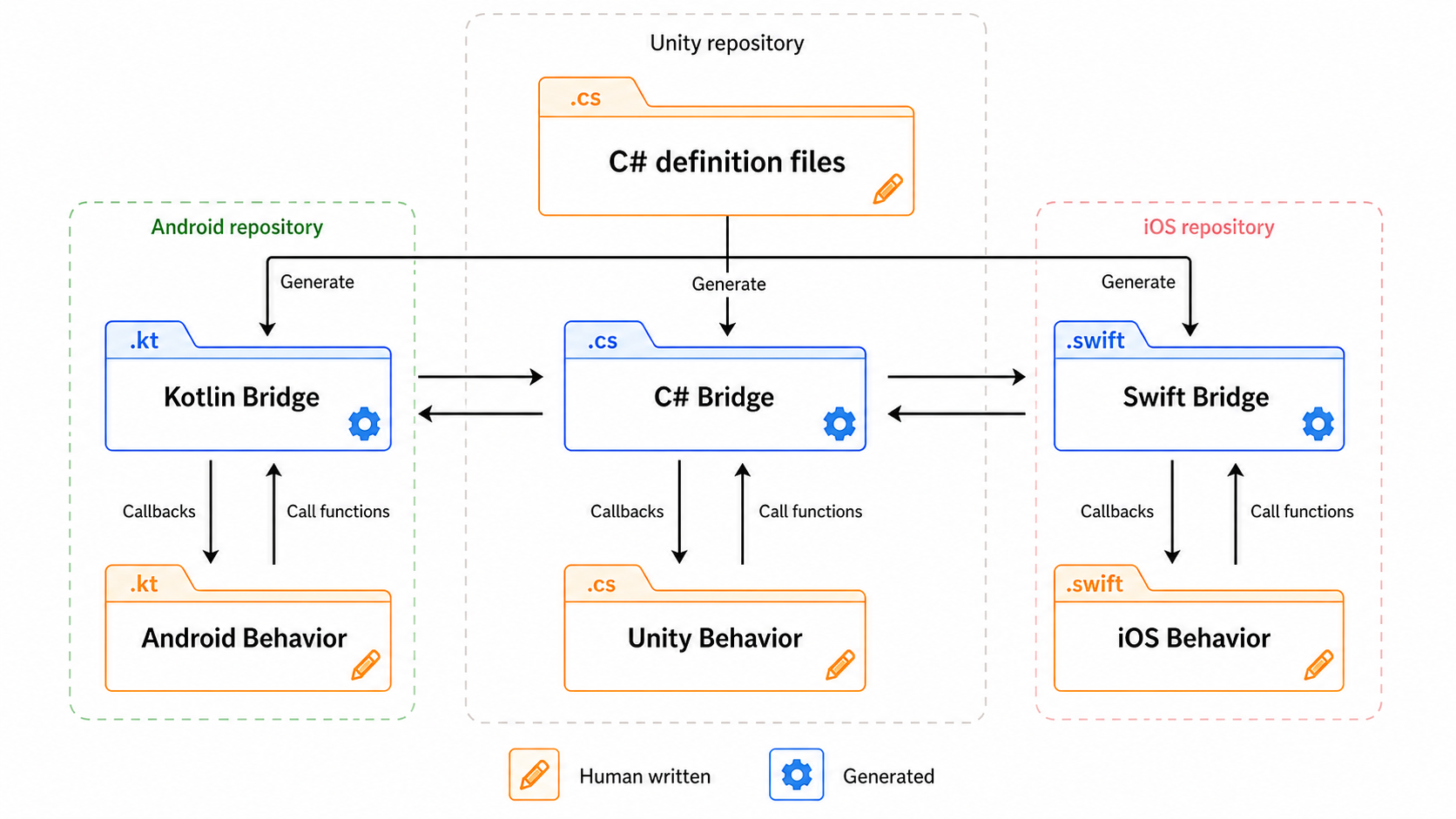
The diagram separates the code engineers write from the bridge code generated from it. The orange files contain the C# contract and each platform’s app behavior. The blue files carry calls and callbacks between Unity, Android, and iOS.
Our workflow has four steps.
- Define or update the C# contract
- Run the native bridge generator
- Review the generated files as the result of that contract change
- Implement the handwritten Unity, Android, and iOS behavior
Generating the repeated transport layer reduces implementation and review work and leaves fewer places for definitions to drift. Review stays focused on the contract and each platform’s behavior.
C# Signatures Define the Direction
We wanted the contract to be readable without adding a separate schema language. The direction comes from the C# member shape.
Native <-- Unity
Unity starts the call. Kotlin and Swift handle it through callbacks registered with the generated APIs.
- No return value
- C# member:
void Method(...) - Generated API: callback registration
- C# member:
- Native returns
R- C# member:
UniTask<R> Method(...) - Generated API: registration for an async callback that returns
R
- C# member:
Native --> Unity
Native starts the call through a generated Kotlin or Swift method.
- No return value
- C# member
Action Event { get; set; }Action<T> Event { get; set; }
- Generated API: method that invokes the Unity callback
- C# member
- Unity returns
R- C# member
Func<UniTask<R>> Callback { get; set; }Func<T, UniTask<R>> Callback { get; set; }
- Generated API: async method returning
R
- C# member
Together, these shapes give the generation toolchain enough information to validate the contract without introducing another schema file.
The IAvatarBridge contract below includes one member for each case.
1 | // C# |
From that one C# interface, Kotlin gets callback properties for calls started by Unity and functions for calls started by native code:
1 | // Generated Kotlin |
Swift gets the same bridge shape through a generated Actor protocol:
1 | // Generated Swift |
A Function Call Becomes a Callback
The diagram below uses Android as an example of how a generated API changes form across the bridge. For Native --> Unity, handwritten Android code calls a generated Kotlin function, and handwritten Unity code receives the call through a callback. Native <-- Unity follows the same flow in reverse. On iOS, the generated Swift bridge follows the same pattern.
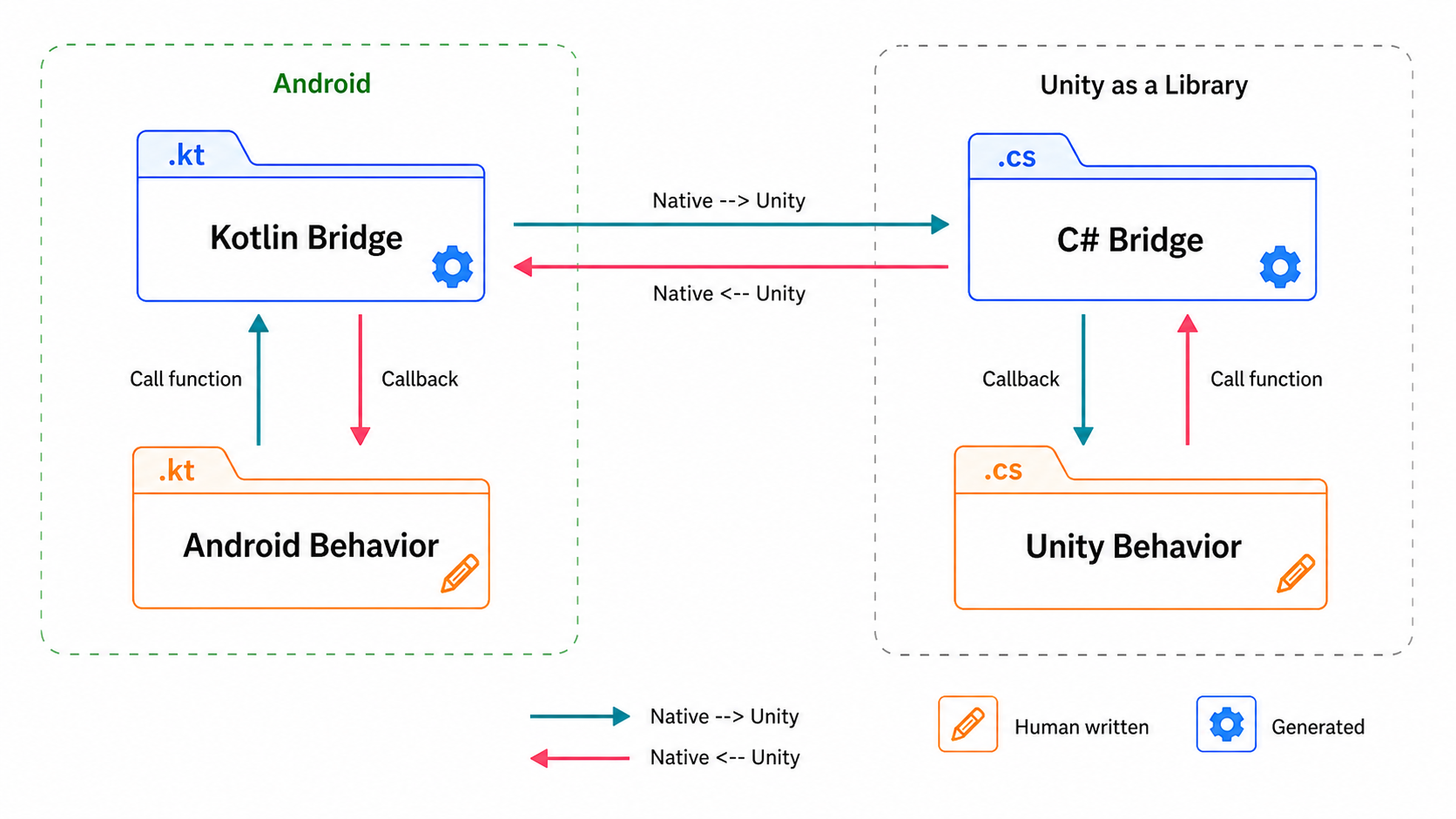
Code generation keeps method signatures and payload types aligned across C#, Kotlin, and Swift. It cannot verify the bridge’s runtime state. When a call happens, Unity must be ready, callbacks must be registered, and native plugins must be loaded.
What’s Next
This article focused on bridge calls where type safety, async flow, and consistency across platforms matter most.
We also have another Unity bridge for face tracking data sent at high frequency. That path has different performance requirements and uses a completely different approach.
Instead of sending messages, native code and Unity agree on a block of memory and a binary layout. Native code writes the latest face tracking values into that memory, and Unity reads them directly every frame.
As someone with a game development background, this technique feels familiar and a little old school. I plan to cover that bridge in a follow-up.
We’re Hiring
AnotherBall is looking for engineers interested in app development using Kotlin/Swift/Unity/AI.
We’re seeking teammates to grow our product together while adopting new technologies like KMM and Compose Multiplatform.