How I Test Every Release as a One-Person QA Team ── Splitting the Work Between AI, Maestro, and Manual Testing
Table of Contents
- The first time an AI tested our app
- How the work is split
- Test case design from the spec, Figma, and the discussion around it
- Using the diff to find the regression scope
- Regression, part 1: AI runs the general suite
- Regression, part 2: turning stable cases into Maestro flows
- Where I still test by hand
- AI as an extra exploratory pass
- What I’d tell another small QA team
- We’re Hiring
Hi, I’m Kyle, the only QA engineer on Avvy at AnotherBall.
QA has been this size since the beginning, with a part-time QA joining for very large features. What changed is the workload. AI sped up our developers and the dev team grew, so every release has more to test. QA stayed small and still keeps pace with development, without slowing releases down.
Avvy is a live-streaming app where you appear as a 2D avatar, and a release ships every two weeks, or longer when it carries a big feature. Each one can touch the server, the Unity avatar layer, and the iOS and Android apps, and a bug can start in one layer and show up in another. Our mobile team covered that architecture in an earlier post.
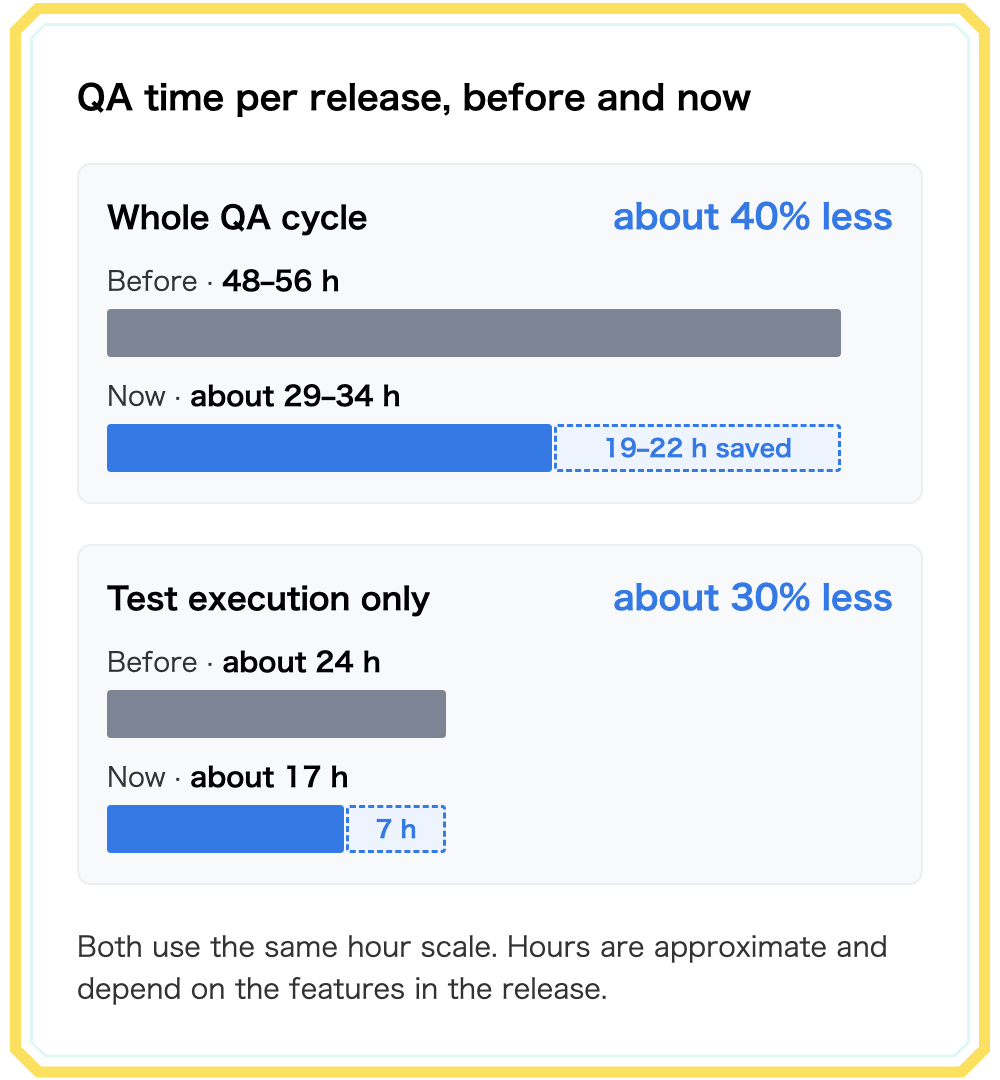
The whole QA cycle for one release (understanding the tickets, planning the test strategy, designing test cases, running the tests, re-testing bug fixes, and giving the go signal for app submission) used to take me about 48 to 56 hours. With the AI test case designer and the other AI and automation tools, it has dropped by about 40%. It doesn’t drop further because reviewing what the AI produces, and improving the tools, takes time too. That 40% is where things stand today. As the tools improve and their results get more reliable, they’ll need less review, and I expect the number to grow.
Test execution alone, which used to take about 24 hours, is down by about 30%. The bigger saving comes before any test runs. AI pulls together the ticket discussions, comments, spec updates, and Figma, asks questions when they don’t line up, and shows which tickets are related. It also finds the regression scope from the code diff, because it sees the code itself, not just the app. Both are mostly reading, which is where AI saves me the most time.
The first time an AI tested our app
The first time I watched an AI test our app, there were no automation scripts involved at all. It opened the app and tested it by following the test case design, and back then those designs weren’t even very descriptive. That surprised me. It also made me realize that with more descriptive designs and a better skill, this could become a reliable way to test. It isn’t at the level where it can replace deterministic automation or manual QA yet, but it’s a big part of how one QA engineer keeps up with every release.
A skill here is a Claude Code skill: a Markdown file of instructions plus a few helper scripts. Each AI part of my QA work is one, and most of their instructions are rules I added after a run went wrong. None of it is finished. I review the AI’s results and keep checking how reliable each skill is.
How the work is split
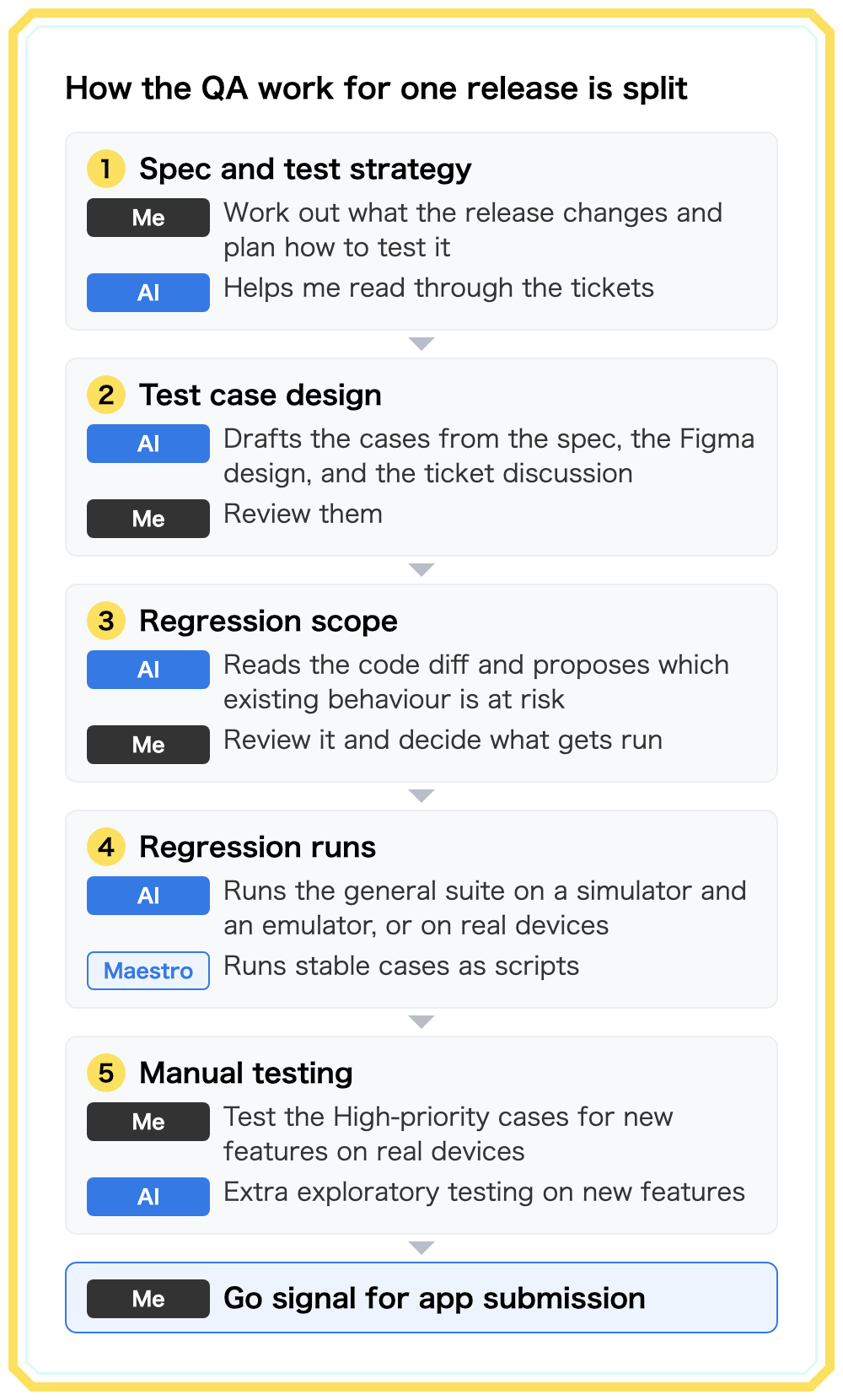
The work splits into five parts:
Test case design from the spec, Figma, and the discussion around it
The first skill takes a Linear ticket and drafts a test case design, which I review before any of it is used. The ticket description alone isn’t enough. Decisions get reversed in the comments, a sub-ticket, or the parent epic, and the Acceptance Criteria often stays as first written. So the skill reads the whole ticket family. When a comment and the spec disagree, it follows the more recent one and records the conflict as a question for the team, so the stale ticket gets fixed instead of quietly ignored.
A real case: Avvy has a flea market where users sell avatar items to each other for coins, and sellers got the ability to edit a listing’s price. The epic’s requirement said a purchase can’t go through while the seller is editing, which reads as the listing being locked. In a sub-ticket’s comment thread, the developers decided something different. The purchase goes through, the seller’s save is rejected with the server’s error message, and the edit screen stays open.
The skill found that decision, wrote the test cases to it, and flagged the requirement as stale. It also checked the code and found there is no lock at all. The only safeguard is that saving a new price cancels any checkout a buyer already had open at the old price. That’s a different guarantee from the one the requirement describes, so it went to the team as a question. Doing that by hand means reading every thread on every related ticket, which used to take a big chunk of my time.
Two more rules do most of the work. The skill never invents requirements: if the spec doesn’t say what should happen, it writes a question for Product, Design, or Engineering instead of guessing an Expected Result. And it reads Figma as numbers. A case like “verify the layout matches Figma” just hands the real work to whoever runs it, so the skill pulls the frame’s geometry and design tokens through the Figma MCP server, a connector that lets the AI read Figma files directly, compares them with the app’s code, and writes something a person can check on screen:
1 | The button is inset 8dp from the thumbnail's top-right corner, |
When the design and the code disagree, the design wins. Every case also gets a High, Medium, or Low priority, which later decides what I test by hand.
Using the diff to find the regression scope
A ticket tells you what is supposed to change, not what else the change touched. So before writing cases, the skill reads the implementation’s diff and adds a last section, “Regression — diff-derived”. It covers screens the ticket didn’t mean to change, other screens that use a shared component the diff touched, and deleted strings or images that might still be referenced. That section is the AI’s proposal for the regression scope. I review it and decide what actually gets run.
The rule I care about most here: code is a source of test ideas, never of expected results. A case whose expected result is “whatever the code does now” can’t fail, so it proves nothing. If the code disagrees with the spec, the case is written to the spec, and the gap goes to the team as a question.
Regression, part 1: AI runs the general suite
Every release gets the same general regression suite, currently 53 end-to-end test cases. The regression skill builds the latest release branch of both apps, runs every case on an iOS Simulator and an Android emulator, and posts the results to Slack. It can also run every case directly on a real iPhone and Pixel, with no scripts: it drives the phone step by step, the same way it drives a simulator. Sometimes I start a run at night, leave my machine on, and review the results the next day. This is where the first run I described earlier happened, and three lessons have moved it closer to reliable since.
Always build from the latest commit
On one run, the local release branch was two commits behind. Gradle reported everything up to date and the app launched normally, but the missing commits bumped Unity as a Library (UaaL), the Unity build embedded in both apps and the dependency behind every avatar screen in the suite. The report would have looked valid while testing the wrong build. Now every run starts by confirming the local commit matches the remote branch, then builds and installs fresh. On a real phone, it checks that the installed build is the latest release build instead. No case runs until that passes.
An honest status for every case
Left alone, an AI can report a pass just because a tap didn’t return an error. So a case is only PASSED if the expected result was actually observed on screen, and the skill has six statuses instead of two:
| Status | Meaning |
|---|---|
| PASSED | The expected result was observed |
| FAILED | Observed behaviour contradicts the expected result |
| BLOCKED | Can’t run on a simulator, or an earlier failure prevents it |
| MANUAL | The suite marks the case as manual only; never attempted |
| NOT RUN | Attempted, but couldn’t be confirmed either way |
| N/A | Doesn’t apply to this platform |
NOT RUN matters most. It gives the AI an honest answer for “I’m not sure”, so it doesn’t have to pick between PASSED and FAILED. MANUAL stays separate from BLOCKED, so a case I chose to test by hand doesn’t make a clean run look broken.
A failure isn’t always a bug
Sometimes the suite’s wording is what’s out of date. The sheet said typing in a name field stops at the character limit. The app lets you keep typing, but it shows “Exceeds character limit” and disables Save. The user is still protected; only the mechanism changed. That case is still recorded as FAILED so the drift isn’t hidden, but the report groups these apart from real breakage and suggests new wording for the suite. Otherwise developers go hunting for bugs that don’t exist.
Regression, part 2: turning stable cases into Maestro flows
An AI run is flexible. It reads a case written in plain English and figures out how to execute it. It is also slow, and its results need reviewing. For cases that never change, a script is the better tool: it runs the same way every time. Maestro flows run as-is on real Android devices. The Maestro CLI itself doesn’t support real iPhones, though, so on iOS I run the same flows through maestro-runner, an open-source runner for Maestro flows.
So I’ve started converting regression cases into Maestro flows, beginning with blocking and unblocking a user. A skill writes the flow, adds UI tags (stable test IDs) shared by both apps, and opens pull requests for developers to review. Nothing is committed without my go-ahead. Two lessons from the pilot:
- A flow must leave the account exactly as it found it. Anything it blocks, it unblocks in the same run, or the next run fails for reasons that have nothing to do with the app.
- Small platform differences, like “Select all” versus “Select All”, break text selectors. That’s why the flows target UI tags instead of visible text.
This part is still early. Maestro only covers regression cases so far, flows for new features are in progress, and the generator’s reliability is still being evaluated.
Where I still test by hand
Manual testing didn’t go away. It moved.
My own time now goes to the High-priority cases for new features, on real devices, where a wrong PASS costs the most. That includes everything a simulator can’t do: real purchases, the camera and face tracking, Unity rendering on real GPUs, streams with a second live account, and push notifications. Avvy has had avatar bugs that only reproduced on specific Pixel models. Signing in and creating accounts stay with me too, because the AI never types credentials, not even for a test account.
Some things AI and automation can’t check at all yet. Whether an avatar looks right, and whether a stream sounds right, still come down to a person looking and listening. The plan is to do R&D on covering both with AI and automation eventually. AI also isn’t used for production testing yet. Testing on the production environment is done by hand or by automation only.
AI as an extra exploratory pass
The AI also runs on new features, and I treat that as exploratory testing. A feature-test skill builds the ticket’s release and runs the cases in the test case design, marking each case PASS, FAIL, or NEEDS MANUAL with a reason. When it reports a bug, I reproduce it by hand first. If it reproduces, I file it. If it doesn’t, it’s treated as a false positive, and that case goes back into improving the skill. A PASS on a High-priority case is a good sign, not a sign-off.
Two bugs from one release show what that extra pass is good at. Both were on Android, and both came from cases the spec never asked for.
The first was on the flea market screen. With more than 20 listings, turn off the network and pull to refresh, dismiss the network error, turn the network back on, and scroll down to load more. Instead of the next page, the app loaded page 1 again and added it below as duplicates. The cause was that the app cleared its pagination cursor at the start of every refresh, before the request went out. When the refresh failed offline, the cursor was already gone, so the next load-more asked the server for page 1. That’s five steps in a specific order, the kind of sequence I rarely have time to try by hand on every list screen.
The second was on the post creation screen. With two or more images attached, every character typed into the caption made the images flicker. The image loader was set to force a fresh load on every redraw, and typing redraws the screen, so each keystroke reloaded every image. This was a regression in an old feature. Cases like this one normally aren’t run during regression, but the AI caught it.
The AI found them because of how its test case design is made. The feature-test skill tests from the design, and the skill that drafts the design adds two kinds of cases on top of the spec. One is network cases for any feature that talks to the server: losing the connection, slow or unstable networks, timeouts, and server errors. The other is regression cases worked out from the code diff. That combination is what led the AI to both bugs.
What I’d tell another small QA team
Know the app before you hand work to AI. The skills are only as useful as my ability to judge what they produce, and spotting a missing edge case or telling a real failure from stale wording takes a deep understanding of the app and its domain. AI speeds up someone who already knows the product. It doesn’t give you that knowledge.
Write every failure down as a rule. The skills got better because each bad run added a line explaining what went wrong, not because the first version was good.
Give the AI a way to say it doesn’t know. NOT RUN in the regression skill and NEEDS MANUAL in the feature-test skill are why a pass in my reports means something actually saw it pass.
Keep the spec as the source of truth. The code tells you where to look, and the design tells you what the numbers should be, but neither one decides what “correct” means.
We’re Hiring
AnotherBall sits at the intersection of entertainment and technology. We build products that connect people to the content and communities they love — and we use AI across the full stack to do it better and faster.
If that sounds like the kind of environment you want to be part of, we’d love to hear from you.